
Table of Contents
Starter Template
Compatible with DokuWiki
- 2025-05-14 "Librarian" unknown
- 2024-02-06 "Kaos" unknown
- 2023-04-04 "Jack Jackrum" yes
- 2022-07-31 "Igor" unknown
 The template that gets you started
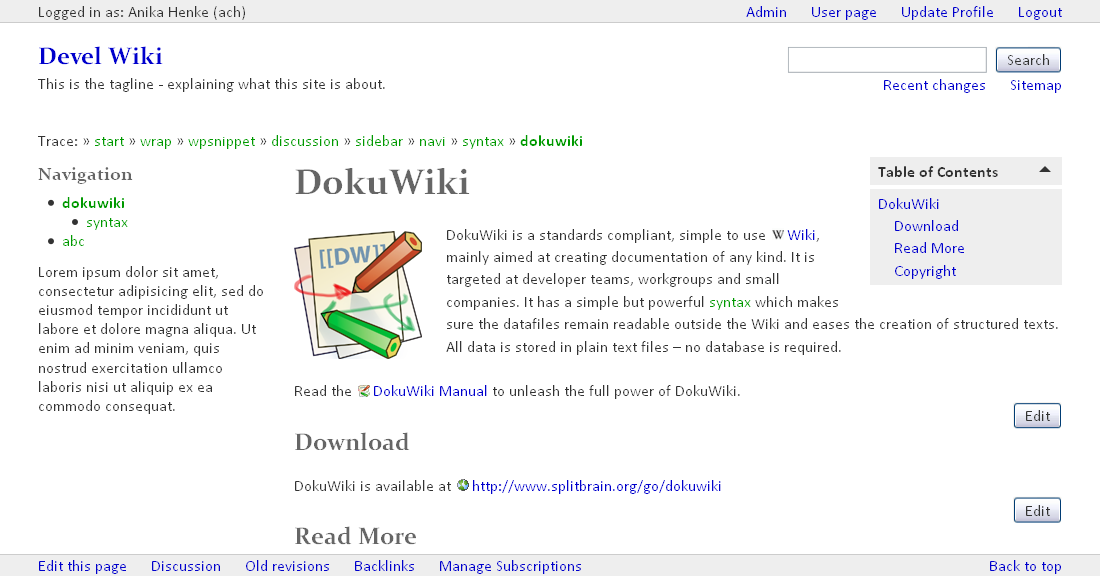
Similar to benjamin, twigstarter
The Starter Template is designed to be the starting point of your custom template. It has a lot of inline comments in the code which should explain many things. It focuses less on design, but more on maintainability.
It is done in a way which lets you worry less about DokuWiki's core styles. Instead you only need to care about the five main styles:
basic.css: You probably only want to touch this if you'd like to change general font sizes and font stacks.structure.css: You probably only want to touch this if you'd like to change the general structure of the site (to 3 columns or have different widths or make everything fluid or switch the sidebar to the right, etc).design.css: Here you can style all the bits that surround the page content.content.css: Here you can style all of the page content.mobile.css: Here you can style all of the changes for mobile devices and smaller screens.
You can find further advice on How to create an easily maintainable DokuWiki template written by Andreas Haerter (based on a former blog post by Michael Klier).
Refer to Template Development documentation for general information.
Download and Install
- For DokuWiki version 2014-05-05 (Ponder Stibbons) and later: Use the extension manager to install this template.
- For Binky or Weatherwax: You can download an older version.
- If you're interested in a more stripped down version of the template, you can use the "minimal" branch. That version hardly uses any CSS at all and doesn't include any additional functionalities.
Refer to template on how to install and use templates in DokuWiki.
Configuration
These are in [theme root]/starter/conf/default.php. It can be changed from the Configuration panel.
| config option | description | default value |
|---|---|---|
hideTools | hide editing and other tools when not logged in | 0 |
sidebarIsNav | use a nav element around the sidebar if it's mainly used for navigation, otherwise use an aside element (new since version 2021-01-25) | 1 |
Config options in previous versions (removed in version 2021-01-25):
discussionPage: Discussion page functionality was removed and can be replaced by using the Talkpage Plugin; just change thetalknsoption from 'talk' to 'discussion' to use the same namespace as beforeuserPage: User page functionality was removed and can be replaced by using the Userpage Plugin
More Info
Credits
- Thanks to Andreas Gohr for general advice.
- Thanks to Clarence Lee for his design advice, especially concerning typography.
Changes
If you are a template author using this template as a base for your own, you might want to check out the list of detailed changes.
- version 2024-01-21 (2024-01-21 14:12)
- treat inline SVGs the same way as other IMGs in CSS (2024-01-21 14:12)
- adjust extensions for changed stylesheets from core in style.ini (2024-01-21 14:11)
- version 2021-01-25 (2021-01-25 15:15)
- Hide background images from menu items inserted via plugins (2021-01-25 15:12)
- Add semantic section elements and config if sidebar is nav or not (2021-01-25 15:11)
- Add mobile menu (but commented out) (2021-01-25 07:33)
- Implement new menu system (fixes #14) (2021-01-25 07:31)
Demo
Templates based on Starter
Comments
- clear and useful! great!
- thank you, this template is very clean and useful for most cases! love this :)
- Very nice stuff.
How to translate this theme?
There are three files to translate:
- lang/en/lang.php is for everything you see on the frontend (although the “accessibility headlines” are hidden for most users) plus descriptions for style.ini placeholders which the Styling plugin in the admin section uses. This file is the most important to translate.
- lang/en/settings.php is for the configuration admin. This file is not as important as the other, as it will only be seen by the admin(s).
- lang/en/style.txt is for extra information about configuration of the template displayed under the form of the Styling plugin in the admin section.
You can either send me language files to update by email or post them here or in the bugtracker. Please have a look at the available translations first.
How to insert a logo image instead of text?
Open the template's main.php and search for “logo”. It's explained in there.
CSS bug w/ zoom plugin
An image included with the zoom plugin will scroll over the footer and hide it
I cannot reproduce this. Do you have any more specific information? (Browser, other installed plugins, etc?) — Anika Henke 2011/05/02 16:45
Tools hidden - can't login
In the template config, I selected «hide editing and other tools when not logged in» and then I logged out. But now I can't log in as there is no «Login» button/link showing.
Am I missing something? — Nactus 2011-11-10
You probably need to save/remember the login URL (you can get it just by adding?do=loginto any DokuWiki URL). In fact I use the following bookmarklet:
javascript:window.location=window.location+"?do=login"(I'm assuming the use of webserver rewriting) —Antonio Bueno 2011/11/11 21:40
That sounds like a good idea! Thanks — Nactus 2011-11-13
Backlink for Discussion Has Wrong Page ID
in line 31 of tpl_functions
tpl_pagelink($backID, $backTitle);
returns
discussion:home
for the page ID when the link is built. The issue is not with the _tpl_discussion function as replacing $backID with 'home' produces the same problem.
A fix is:
tpl_pagelink(':'.$backID, $backTitle);
Thanks. That's fixed since today's release. — Anika Henke 2014-05-19 03:24