
plugin:pagequery
Table of Contents
pagequery Plugin
Compatible with DokuWiki
- 2024-02-06 "Kaos" unknown
- 2023-04-04 "Jack Jackrum" yes
- 2022-07-31 "Igor" yes
- 2020-07-29 "Hogfather" yes
 An all-in-one multipurpose navigation plugin to create index pages; search/filter by full-text or page name; display in columns, grouped, sorted, even has content preview tooltips.
Download and Installation
Plugin forked to support modern versions of PHP and DW Igor
 THIS PLUGIN IS NO LONGER MAINTAINED If you would like to take over as the maintainer please contact me.
VERY IMPORTANT: the plugin requires PHP 7.4 or higher to function. Refer to Plugins on how to install plugins manually.
NEWS—2013-10-07: new popup syntax “cheatsheet” now available from the Edit Toolbar via a new button! New language also: Dutch.
NEWS—2013-10-06: new filtering options: links (page links), and backlinks (backlinks to the page). These are space delimited lists of page ids that can be filtered using the filter= regex feature (see below for details).
2013-03-27: Weatherwax compatible; group header bugfix
2013-03-08: significant update
- compatible with Adora Belle and PHP 5.4.
- display option: further changes. All metadata/sorting fields can be used to create the displayed page link. Put fields in {}. E.g. “{name} ({mdate})” would produce: “Page-name (01-Jan-1970)” where mdate is the modified date of the page.
- new layout option: choose between table or column.
- table: old-school html tables are used to create the multiple columns.
- column: CSS3 column-layout is used instead. This requires a more up-to-date browsers, but works better when the window is re-sized.
- quite a few smaller options have been re-named for clarity (see syntax table below).
- filter option now handles date more elegantly. You can filter the list based on dates, before, after, between, using real numeric dates, or even time periods in words (last week, 2 days ago, etc…)
- Many small tweaks, and overall code clean up.
Release History
Development history on GitHub:
- Update plugin.info.txt (2024-02-14 10:57)
- Fix TypeError (#29) (2024-02-14 10:56)
- Merge pull request #30 from mprins/CI-fixes (2024-02-14 10:54)
- Fix TypeError (2024-02-14 10:52)
- fix line length (2024-02-14 10:48)
- Update CI workflow (2024-02-14 10:45)
- 🤖 Rector and PHPCS fixes (#28) (2023-11-19 15:35)
- Update maintainance.yml (2023-11-19 15:29)
- 🤖 Rector and PHPCS fixes (#26) (2023-11-08 16:15)
- add autofixer (2023-11-08 16:03)
Overview
There are many different page listing / navigation plugins on the plugin page, all trying to serve different needs. Pagequery tries to unify many of the ideas into a compact all-in-one method of listing your wiki pages, by name, title, a-z index, by date, by year, month, day, by namespace or by creator; …and do it quickly.
On the surface it may appear to fill a similar role to the really excellent IndexMenu, however pagequery's aspirations are not as lofty or elaborate. IndexMenu focuses on displaying namespaces, and the pages within. allowing you to sort the namespaces and files by many options, and actively navigate and manipulate this index. Pagequery's purpose is displaying lists of pages: yes, you can sort by namespace if you wish, however the main goal is to search for and list pages in any order, and then neatly display them in groups (A-Z, by year, by month, etc…) and in addition in columns — to make best use of space. If you try both of them you'll quickly see that they “scratch different itches.”
Features
- Create all sorts of indexes for your wiki: A-Z, recent, created by, authored by, start pages
- Search all the pages in your wiki
- Or limit your search to a specific namespace
- Search for words in the page content as well–fulltext!
- Search by page name using regular expressions
- Sort lists by A-Z, by name, by year, by month, by day, by author, and many other options
- Split your list into groups, with headers above each one: A..Z, 2010…2009, Jan..Dec, author's name
- Display links based on the page's title instead of page name
- See a useful content preview tool-tip when you hover over each page link
- OR create a great blog-like start page, where links are followed by a neat snippet of the page content
- Make full use of space: display your list of links in columns
- Put borders around the columns for clarity
Nothing worthwhile is built in isolation: pagequery has been built on the shoulders of giants — i.e. the DokuWiki core functions. Under the skin it makes shamefaced use of the excellent built-in page and full-text search functions available in DokuWiki, so there's no new search syntax to learn. However it does bring a little something new to the mix by providing powerful sorting and grouping options.
Some possible uses:
- Listing all the pages in your wiki in a nice A-Z index, or a By Year/Month index
- A recently modified list of pages
- Listing pages that discuss a particular subject (via full-text search)
- Listing all pages created by a certain user
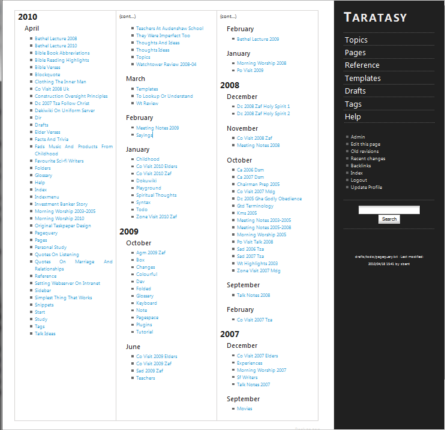
Here's an example of all the pages in a namespace listed by date modified, and grouped by year and month:
Syntax and Usage
Insert the pagequery markup in the page text wherever you want your list to appear. You can have different pagequery lists on the same page1).
It could be simple:
{{pagequery>}}
Or complicated:
{{pagequery>[query];fulltext;sort=key:direction,key2:direction;group;limit=10;cols=2;spelldate;proper}}
Or just plain ol' too complicated…:
{{pagequery>[query];fulltext;sort=key:direction,key2:direction;group;limit=100;cols=6;spelldate;proper;snippet=5;border=inside;hidestart;case;natsort}}
NEW: the syntax can now be spread over multiple lines for clarity, rather like a programming language. Any whitespace is simply ignored. E.g.
{{pagequery>query;
  fulltext;
  sort=key:direction,key2:direction;
  group;
  limit=100;
  cols=6;
  spelldate;
  proper;
  border=inside;
  hidestart;
  case;
  natsort
}}
Yes, I know the syntax table below is overly long and looks intimidating—hopefully if you persevere and start learning how to use it you'll soon be asking if it can be adapted to your particular needs…as many people already have on the discussion page. Well, it's become pretty flexible over time, but all these options need to be defined somewhere, hence the long list below… However they all have default values so you can start using them only when you realise a specific need.
As a general rule the different options are separated by semi-colons (;), different values (e.g. within the sort or filter) are separated by comma (,); multi-part values by colon (:).
Complete Syntax Table
| Option | Description | Syntax Examples | Default |
|---|---|---|---|
| query | Put the search expression directly after the >, e.g. {{ pagequery>help;... }} By default it searches only in the page names (or page id). To search within the content of wiki pages use the fulltext option below | * help test | all pages |
| You can use regular expressions2)in page name queries. To see all pages use * or .* , or just leave it blank.3) | ^p.+ [words starting with p] | ||
Note: * by itself is just a convenience, in any other regex you'll have to stick to the regex rules. |
|||
| namespaces | Page name search accepts the same namespace options as fulltext search, that is: ^ or -ns: means exclude, @ or ns: means include | ^:work @:home:games * | none |
| Relative (.) and parent (..) namespaces are also supported4) | |||
Note: if you use the namespace option then you must provide a page name query also (at least *), because, for example, the regex function cannot distinguish between ^work (namespace), and ^work (page names beginning with “work”) |
|||
| fulltext | Use a full-text search, allowing all DokuWiki search options. This option allows you to do all sorts of elaborate searches: check out the search page for details | fulltext | |
| fullregex | Allows you to search the full page id (i.e. including its namespace) using regular expressions. This is a raw power-user mode…but it only works on page ids | fullregex | |
| sort | Keys to sort by, in order of sorting. Each key can be followed by a preferred sorting order, sort=key:direction,key2:direction | sort=a:asc,name:asc sort=cyear,cmonth,name | none |
| sort keys: | |||
| a, ab, abc | By 1st letter, 2-letters, or 3-letters | sort=a sort=ab | |
| name, pagename | By page name5) [not grouped] | sort=name | |
| title, heading | By page title (or 1st heading) [not grouped] | sort=title:desc | |
| id, pageid | By full page id, including namespace [not grouped] | sort=id:asc | |
| ns | By namespace (without page name) | sort=ns | |
| mdate, cdate | By modified/created dates (full) [not grouped] | sort=mdate | |
| m[year][month][day] | By [m]odified [year][month][day]; any combination accepted | sort=myearmonthday sort=mmonthday | |
| c[year][month][day] | By [c]reated [year][month][day]; any combination accepted | sort=cyearmonthday | |
| creator | By page author | sort=creator | |
| contributor | By page contributor(s). Note: only first name affects sort order6) | sort=contributor:asc | |
| links | By a list of links contained on this page (mainly for filtering). The names (or ids) of all linked pages are joined in one space-delimited string, which can be searched via regex in the filter option below. | ||
| backlinks | By a list of backlinks pointing to this page or these pages. Use as per links above. |
||
| sort directions: | |||
| asc, a | Ascending, e.g. a → z, 1 → 10 | sort=name:asc | asc |
| desc, d | Descending, e.g. z → a, 10 → 1 | sort=mdate:desc | |
| Note: dates default to a descending sort (most recent date at top), text to ascending sort (A - Z) | |||
| filter | Filter the result list by any of the above sort keys, using regular expressions, to include or exclude certain pages | ||
| include | Syntax is similar to the sort above: filter=<key>:<expression>,<key2>:<expression2> | filter=creator:harry filter=contrib:.*(harry|sally).* |
|
| exclude | To exclude pages from the results put a ^ or ! before the key instead: filter=!<key>:<expression> | filter=!creator:harry |
|
| dates | filter= option now recognises real dates and allows you to filter by them correctly. E.g. filter=cdate:3 years ago->3 months ago |
||
| A begin and/or end date can be provided, separated by the -> arrow symbols. It uses the PHP strtotime function which accepts a wide array of formats, check the php function for information. | |||
| From a certain date until now | filter=mdate:24.1.2009-> |
||
| Up to a certain date only | filter=mdate:->24.12.2012 |
||
| Last three months only | filter=mdate:3 months ago-> |
||
| group | Show a group header for each change in sort keys.7) | group | not grouped |
| For example, if you sorted by [myear] (i.e. modified year) then a group header will be inserted every time the year changes (2010…2009…2008…etc…) |
|||
Namespaces are grouped by all sub-namespaces up to the maxns limit8) |
|||
| Note: keys that are all unique cannot be grouped (i.e. name, page/id, mdate, cdate) | |||
| limit | Maximum number of results to return. 0 = return all (default) | limit=10 | all |
| spelldate | Use real month and day names instead of numeric dates. | spelldate | numeric dates |
| cols | Number of columns in displayed list (max = 6) | cols=3 | 1 |
| proper | Display page names and/or namespaces in Proper Case (i.e. every word capitalised, and no _'s). | none | |
| name | Display page names in proper-case | proper=name | |
| header | Display group headers in proper-case | proper=header proper=hdr | |
| both | Both the above options! | proper=both proper | |
Note: this is different from the UseHeading option in DokuWiki and many other plugins (see display option below) |
|||
| border | Show a border around table columns | none | |
| none | do not show any borders (default) | border=none | |
| inside | show borders between the columns only | border=inside | |
| outside | show a border around the whole pagequery table | border=outside | |
| both | show borders around both table and columns | border=both border | |
| hidestart | Ignore any default start pages in the namespace(s). | hidestart | show start pages |
| Note: start pages must be named as per the start setting in your configuration for this option to work correctly! | |||
| display | How to display the page links. For example you can display just the page name, page title, page id, page date, or other combination of the page's metadata. | ||
| The display= option accepts template-style replacement strings | display={name} ({cdate}) “Name-of-page (20 Jan 2013)” |
||
| NOTE: all metadata names must be in curly braces {}, otherwise they are just considered as normal words! | |||
| All of the Dokuwiki meta data fields are accepted, plus any pagequery meta columns in use. To get at the nested Dokuwiki metadata use key:subkey. | display={date:created} {title} |
||
| See metadata for a list of field names you can use. | |||
| snippet | Controls how the page snippet (preview) is displayed: | tooltip | |
| tooltip | As a pop-up/tool-tip on each page link | snippet=tooltip snippet | |
| The next three options use the following syntax: <format>,<count>,<extent> | |||
| <format>: one of the formats listed below: inline, plain, quoted | |||
| <count>: to show 1st <count> items in list with an preview | all | ||
| <extent>: can be choice of [c]hars, [w]ords, [l]ines, or [~]<stop at> e.g. c? = ? chars, w? = ? words, l? = ? lines, ~? = search up to ? text/char/symbol | all | ||
| inline | show in-line with the link | snippet=inline,5,c20 | |
| plain | show as simple text below the link (mimimal formatting) | snippet=plain,10,w30 | |
| quoted | show in tidy quotation box | snippet=quoted,3,l3 | |
| maxns | The number of namespace levels to display. | show all | |
| Display no more than 3 namespace levels, e.g. one:two:three | maxns=3 | ||
maxns=0 ⇒ show all levels (default) | |||
| case | Honour case when sorting, i.e. a..z then A..Z | case | case insensitive |
| natsort | Use PHP's natural sorting functions, e.g. 1,2,10,12 rather than 1,10,12,2 | natsort | normal sorting |
| underline | show a faint underline between each link for clarity | underline | none |
| label | A label to be displayed at the top of the PageQuery list | label=A-Z of All Pages | nothing |
| hidemsg | Hide any empty result messages | hidemsg | visible |
| hidejump | Hide the “Jump To Top” link | hidejump | visible |
| showcount | Show the total count of page links at bottom of list | showcount | hidden |
| layout | choose between table or column layout table: based on html table, compatible with most browsers column: uses new CSS3 column-layout feature, doesn't work in older browsers9) | layout=column | layout=table |
| fontsize | Set the base font size for the pagequery list. You can use any CSS size unit, e.g. 12px, 1.2em, 80%, etc… | fontsize=80% | 90% |
| bullet | Bullet style for list items (links) Choose from none, disc, circle, or square | bullet=square | none |
| Note: All options are optional, and left to its own devices the plugin will default to a long, boring, 1-column list… so you might want to take charge! |
|||
Sorting and Grouping
A few pointers about sorting and grouping successfully. Pagequery offers many sorting options, most of which are designed to be grouped. So if you intend to group your list by its main headers then it makes the most sense to sort from the broadest category to the narrowest.
For example: year ⇒ month ⇒ name. The sorting algorithm will first sort the list of pages by year, then the pages within each year will be sorted by month, and finally the pages within each month will be sorted by name. Sorting the other way around would not make much sense, as all names are unique: hence there would be nothing to “group”!
If you grouped the above sort it would result in the following arrangement:
- Year
- Month
- Name
- Name
- Month2
- Name
- Name
- etc…
The basic rule is: start with the least specific and work your way to the most specific options.
FAQ and Tips
 I've added new pages but they do not show up in my nice new pagequery list. Why?
- You need to turn off page caching for the page containing the list. Put
~~NOCACHE~~
somewhere on the page and you should then see instant updates.
I have many default 'start' pages in my wiki and I don't want to see them when I list the contents of namespaces; how can I make them disappear?
- Just add the
hidestartoption. Make sure that the start option in your configuration corresponds to the start page name you are using!
I would much rather see the page title instead of the page name. How can I enable that?
- Put the
display=titleoption somewhere in your pagequery markup
After migrating my wiki contents to a new dokuwiki version, pagequery doesn't list any pages. Only after editing the pages, they show up in pagequery again.
- Use the SearchIndex plugin to rebuild the index of your wiki, or make sure that you copy over the indexes as well as the content. This problem has nothing to do with pagequery itself.
Examples
For example, if you want to list all the pages in a certain namespace by A-Z, the following should do the trick:
{{pagequery>@namespace;fulltext;sort=a,name;group}} [fulltext version]
Or:
{{pagequery>@namespace *;sort=a,name;group;proper;cols=2}} [pagename version: allows regex's]
This would retrieve results from @namespace only (as there is no other search query you would get all the pages), and the list would be sorted by the first letter ('sort=a') then alphabetically ('sort=name') within each letter. The group option will then cause the list to be grouped by the first letter only (you cannot group by name as each one is unique).
If you wanted to see the results in 3 columns and to have the links in “Sentence Case” with no underscores, then add this:
{{pagequery>@namespace *;sort=a,name;group;cols=3;proper}}
Another example, grouping by year created, then month created, then by name, in 2 columns, and displaying the real month name, plus having the links in “Sentence Case” with no underscores, and to top it off: a border around the table columns:
{{pagequery>@namespace *;sort=cyear,cmonth,name;group;spelldate;proper;cols=2;border}}
The same query, but now searching for pages contenting the word “help” (NOTE: fulltext means search in the page “content” not just its “name”:
{{pagequery>@namespace help;fulltext;sort=cyear,cmonth,name;group;spelldate;proper;cols=2}}
Update: Namespaces are now supported when searching by pagename (pageid) only. Use the same syntax as fulltext search, i.e. @namespace|^namespace. I haven't provide support for relative namespaces yet. In addition, you can use regular expressions when searching by pagename.
E.g. Search for all pages in the “drafts” namespace, listing only files beginning with a number, sorted by name:
{{pagequery>@drafts [0-9]+.*;sort=name}}
Or, all files in the “happy:go:lucky” namespace, sorted by year, then date created, in proper case, in 2 columns, and display the page's title, not the name in the listing:
{{pagequery>@happy:go:lucky *;sort=cyear,cdate;group;proper;display={title};cols=2}}
Hopefully these examples will help to understand the workings of pagequery.
Discussion
See the separate discussion page.
1)
this works well with the columns plugin
2)
AKA: regex; just Google for 'help regular expressions' if you are interested in using this powerful feature
3)
as long as you are not filtering by namespaces: see next note!
4)
use the syntax presented on the namespace page.
5)
without namespace
6)
not so useful, but handy for use in the
filter option below7)
For a more detailed explanation of grouping see the note after this table
8)
see below
9)
please do not write telling me that it doesn't work in IE 6-10…that's life.
plugin/pagequery.txt · Last modified: 2024-02-14 10:57 by mprins